Know what needs attention
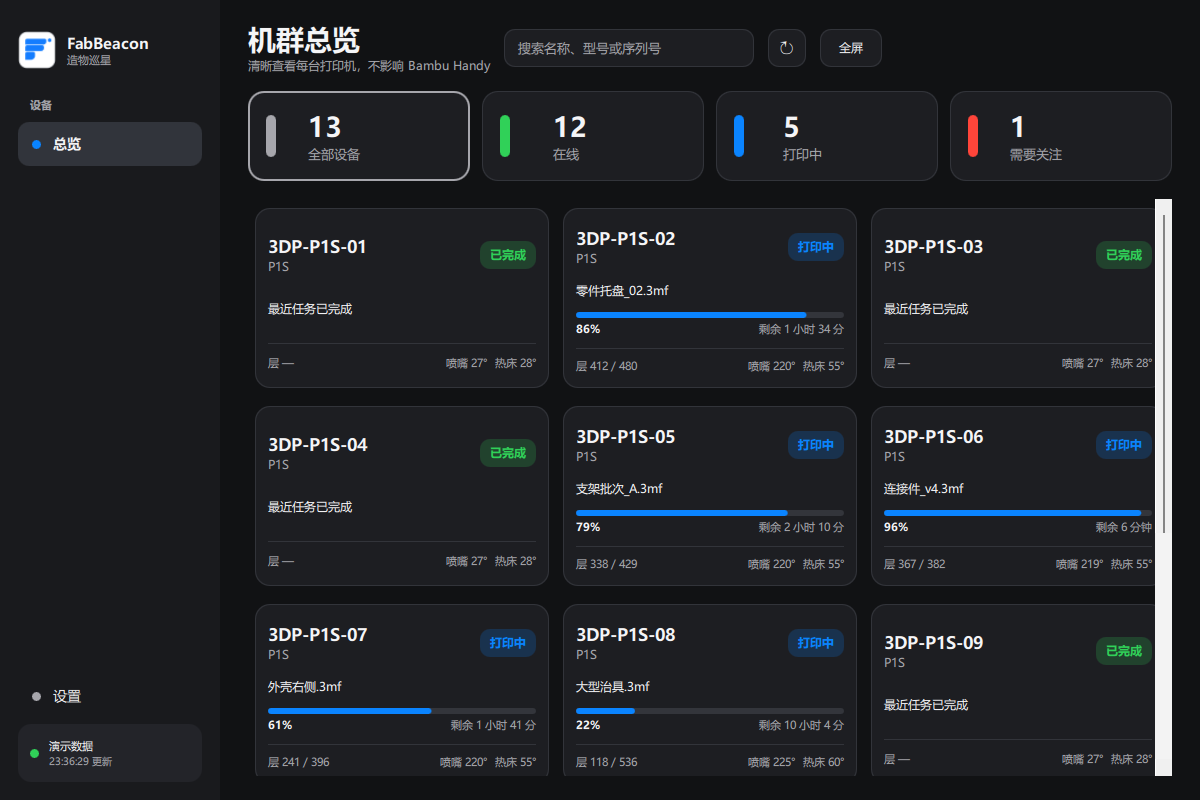
See online, printing, complete and attention states without opening each printer one by one.
Status at a glanceAttention signals
 FabBeacon造物巡星
FABBEACON / PRINT VISIBILITY
Monitor your Bambu Lab printers from one Windows desktop dashboard. See print progress, temperatures and connection status without opening each device. Printer control stays in Bambu Handy or your usual tools.
v0.5.2 · Windows preview · One official package · GitHub Releases
THE USEFUL VIEW
Free shows every printer in one locally saved Bambu connection, with overview, search, filters, details and full-screen monitoring. An internet connection and Bambu cloud access are required.
See online, printing, complete and attention states without opening each printer one by one.
Read progress, remaining time, layers, nozzle and bed temperature, signal and connection state.
FabBeacon is read-only: it helps you see the fleet while Bambu Handy remains the place for printer control.
GETTING STARTED
Check what you need, connect your accounts, and learn what to look at before you leave the print room. The guide also explains Free, Plus and gaps in local history.
Read the Bambu Lab monitoring guide · Troubleshoot an empty list or stale status · See how Bambu Handy and FabBeacon work together
PLUS / ONE PRODUCT
FabBeacon uses one Windows app and one membership model for every user. FabBeacon Plus is priced at US$2.99 per month or US$24.99 per year. The free edition remains available without a subscription.
Free covers one Bambu connection and all its printers. Plus adds multiple connections, the farm matrix, groups, alerts, local history, maintenance tasks and production reports for US$2.99 per month or US$24.99 per year.
No Plus trial · subscription access starts after payment · manage billing or cancel through Paddle Customer Portal.
REDEEM CODE
Promotions, events and community programs may provide redeem codes. Sign in to FabBeacon first, then redeem the code inside the app.
SUPPORT
For product questions or preview feedback, contact FabBeacon support. Please never send passwords, verification codes, access tokens or full device serial numbers.
MAINLAND CHINA USER SUPPORT
GitHub downloads may be affected by your network environment. If the download is slow or fails, the official QQ group can provide the same-version installer and support.
The group file is a manual backup distribution channel, not a different build or a mainland-specific version.
Check the version and SHA-256 against the matching GitHub Release before opening any backup copy.
581f39a7948b3e01157385151fc2ac4ba573eed948e5786005c5f48f349194ebPromotions, events and community programs may provide redeem codes. Redemption must be completed inside FabBeacon after signing in.
DESIGNED TO STAY SIMPLE
FabBeacon keeps its job narrow: show your fleet clearly, process status on your computer, and leave printer control with the tools you already trust.
No control commands and no unnecessary workflow changes.
The preview does not build a cloud printer database or upload diagnostics automatically.
Every public package is paired with a version and SHA-256; signed update checks remain manual.
Download the current Windows preview from the official GitHub Releases page.